Easily Commit and Tag your WordPress Plugin to the WordPress.org SVN Repo From Finder on a Mac
If you develop WordPress plugins and submit them to the WordPress.org plugin repository, you already know that releasing an update through SVN isn’t particularly difficult. It is, however, repetitive.
Normally I have to open Terminal, navigate to the plugin’s SVN directory, check the version, update the stable tag, add any new files, commit everything, create the new tag, and then make sure the tag actually made it to the WordPress.org repository.
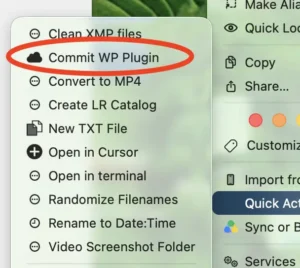
I wanted to simplify that process, so what I ended up creating is a Mac Automator Quick Action called Commit WP Plugin.
Now I can simply right-click a WordPress plugin folder in Finder, choose Commit WP Plugin, and the script does most of the release process automatically.
It will:
- Detect the WordPress plugin SVN repository.
- Find the main plugin PHP file.
- Read the plugin version from the
Version:header. - Check the
Stable Tag:inreadme.txt. - Automatically update the Stable Tag if necessary.
- Run an SVN update before committing.
- Detect SVN conflicts.
- Automatically add new files.
- Detect deleted files and schedule them for deletion.
- Commit changes in
trunkandassets. - Create the new SVN tag based on the plugin version.
- Refuse to overwrite an existing release tag.
- Verify that the new tag exists remotely.
- Display a Mac notification when the release finishes.
This is the setup I use.
Expected WordPress Plugin SVN Structure
This assumes you already have your WordPress.org SVN repository checked out locally.
The folder should look something like this:
my-plugin/
├── assets/
├── tags/
│   ├── 1.0.0/
│   └── 1.0.1/
└── trunk/
    ├── my-plugin.php
    ├── readme.txt
    ├── includes/
    └── ...
The script will work if you right-click either:
my-plugin/
or:
my-plugin/trunk/
I personally right-click the main plugin folder.
Step 1: Create the Release Script
First create a bin directory in your Mac home folder if you don’t already have one.
Open Terminal and run:
mkdir -p ~/bin
Now create the script:
nano ~/bin/commit-wp-plugin
Paste the following script into the file:
#!/bin/zsh

# ============================================================
# WordPress.org Plugin SVN Release Script
#
# Usage:
#   commit-wp-plugin "/path/to/plugin-svn-folder"
#
# You can select either:
#   plugin-folder/
# or:
#   plugin-folder/trunk/
#
# Expected SVN structure:
#
# plugin-folder/
# ├── assets/
# ├── tags/
# └── trunk/
#
# The script:
#   1. Finds the main plugin PHP file
#   2. Reads its Version: header
#   3. Updates Stable Tag: in trunk/readme.txt if necessary
#   4. Updates SVN working copy
#   5. Adds new files in trunk/assets
#   6. Schedules missing files for deletion
#   7. Commits trunk/assets
#   8. Creates remote SVN tag tags/VERSION from remote trunk
#   9. Updates local tags directory
# ============================================================

set -u

# ------------------------------------------------------------
# SETTINGS
# ------------------------------------------------------------

CONFIRM_BEFORE_RELEASE=1

SVN="/usr/bin/svn"

# ------------------------------------------------------------
# COLORS
# ------------------------------------------------------------

RED=$'\e[31m'
GREEN=$'\e[32m'
YELLOW=$'\e[33m'
BLUE=$'\e[34m'
BOLD=$'\e[1m'
RESET=$'\e[0m'

# ------------------------------------------------------------
# FUNCTIONS
# ------------------------------------------------------------

die() {
    echo
    echo "${RED}${BOLD}ERROR:${RESET} $1"
    echo
    exit 1
}

success() {
    echo "${GREEN}✓${RESET} $1"
}

info() {
    echo "${BLUE}→${RESET} $1"
}

warning() {
    echo "${YELLOW}!${RESET} $1"
}

add_unversioned() {
    local dir="$1"

    [[ -e "$dir" ]] || return 0

    "$SVN" status "$dir" 2>/dev/null |
        /usr/bin/sed -n 's/^?       //p' |
        while IFS= read -r path; do

            [[ -z "$path" ]] && continue

            if [[ "$(basename "$path")" == ".DS_Store" ]]; then
                continue
            fi

            info "Adding: $path"

            "$SVN" add "$path" || die "Could not svn add: $path"
        done
}

schedule_missing_files() {
    local dir="$1"

    [[ -e "$dir" ]] || return 0

    "$SVN" status "$dir" 2>/dev/null |
        /usr/bin/sed -n 's/^!       //p' |
        while IFS= read -r path; do

            [[ -z "$path" ]] && continue

            info "Scheduling deletion: $path"

            "$SVN" delete --force "$path" ||
                die "Could not schedule deletion: $path"
        done
}

# ------------------------------------------------------------
# CHECK INPUT
# ------------------------------------------------------------

if [[ $# -lt 1 ]]; then
    die "No plugin folder was supplied."
fi

SELECTED_PATH="${1:A}"

if [[ ! -d "$SELECTED_PATH" ]]; then
    die "Selected item is not a folder: $SELECTED_PATH"
fi

if [[ "$(basename "$SELECTED_PATH")" == "trunk" ]]; then
    ROOT="${SELECTED_PATH:h}"
else
    ROOT="$SELECTED_PATH"
fi

TRUNK="$ROOT/trunk"
TAGS="$ROOT/tags"
ASSETS="$ROOT/assets"
README="$TRUNK/readme.txt"

echo
echo "${BOLD}============================================${RESET}"
echo "${BOLD}       WordPress Plugin SVN Release${RESET}"
echo "${BOLD}============================================${RESET}"
echo
echo "Repository:"
echo "  $ROOT"
echo

# ------------------------------------------------------------
# CHECK SVN
# ------------------------------------------------------------

if [[ ! -x "$SVN" ]]; then
    SVN="$(command -v svn 2>/dev/null || true)"
fi

[[ -n "$SVN" ]] || die "Subversion (svn) is not installed."

"$SVN" info "$ROOT" >/dev/null 2>&1 ||
    die "This does not appear to be an SVN working copy."

[[ -d "$TRUNK" ]] ||
    die "Could not find trunk/: $TRUNK"

# ------------------------------------------------------------
# FIND MAIN PLUGIN FILE
# ------------------------------------------------------------

info "Finding main plugin file..."

PLUGIN_FILES=()

for file in "$TRUNK"/*.php(N); do

    if /usr/bin/head -n 100 "$file" |
        /usr/bin/grep -Eiq '^[[:space:]]*\*?[[:space:]]*Plugin Name[[:space:]]*:'; then

        PLUGIN_FILES+=("$file")
    fi
done

if (( ${#PLUGIN_FILES[@]} == 0 )); then
    die "Could not find a PHP file in trunk containing a Plugin Name: header."
fi

if (( ${#PLUGIN_FILES[@]} > 1 )); then
    echo
    warning "More than one possible main plugin file was found:"
    echo

    for file in "${PLUGIN_FILES[@]}"; do
        echo "  - $(basename "$file")"
    done

    die "Release aborted because the main plugin file is ambiguous."
fi

MAIN_FILE="${PLUGIN_FILES[1]}"

# ------------------------------------------------------------
# GET PLUGIN NAME
# ------------------------------------------------------------

PLUGIN_NAME=$(
    /usr/bin/head -n 100 "$MAIN_FILE" |
    /usr/bin/perl -ne '
        if (/^\s*\*?\s*Plugin Name\s*:\s*(.*?)\s*$/i) {
            print $1;
            exit;
        }
    '
)

[[ -n "$PLUGIN_NAME" ]] ||
    PLUGIN_NAME="$(basename "$ROOT")"

# ------------------------------------------------------------
# GET VERSION
# ------------------------------------------------------------

VERSION=$(
    /usr/bin/head -n 100 "$MAIN_FILE" |
    /usr/bin/perl -ne '
        if (/^\s*\*?\s*Version\s*:\s*(.*?)\s*$/i) {
            print $1;
            exit;
        }
    '
)

VERSION="${VERSION//$'\r'/}"

[[ -n "$VERSION" ]] ||
    die "Could not find Version: in $(basename "$MAIN_FILE")."

if [[ ! "$VERSION" =~ '^[0-9]+(\.[0-9]+)*$' ]]; then
    die "Version '$VERSION' is not a standard numeric WordPress.org release version."
fi

success "Plugin: $PLUGIN_NAME"
success "Main file: $(basename "$MAIN_FILE")"
success "Version: $VERSION"

echo

# ------------------------------------------------------------
# GET REPOSITORY URL
# ------------------------------------------------------------

REPO_URL=$(
    "$SVN" info "$ROOT" |
    /usr/bin/awk -F': ' '/^URL: / {
        print $2;
        exit
    }'
)

[[ -n "$REPO_URL" ]] ||
    die "Could not determine SVN repository URL."

REPO_URL="${REPO_URL%/}"

echo "Remote repository:"
echo "  $REPO_URL"
echo

# ------------------------------------------------------------
# MAKE SURE TAG DOES NOT ALREADY EXIST
# ------------------------------------------------------------

info "Checking for existing tag $VERSION..."

if "$SVN" ls "$REPO_URL/tags/$VERSION" >/dev/null 2>&1; then

    die "SVN tag $VERSION already exists.

Existing WordPress.org release tags should not be modified.
Increase the plugin Version: before creating another release."
fi

success "Tag $VERSION is available."

# ------------------------------------------------------------
# UPDATE TRUNK
# ------------------------------------------------------------

echo
info "Updating SVN trunk..."

"$SVN" update "$TRUNK" ||
    die "svn update failed for trunk."

if "$SVN" info "$ASSETS" >/dev/null 2>&1; then
    info "Updating SVN assets..."
    "$SVN" update "$ASSETS" ||
        die "svn update failed for assets."
fi

# ------------------------------------------------------------
# CHECK FOR CONFLICTS
# ------------------------------------------------------------

STATUS=$("$SVN" status "$TRUNK" "$ASSETS" 2>/dev/null || true)

if echo "$STATUS" |
    /usr/bin/awk '
        substr($0,1,7) ~ /C/ {
            found=1
        }

        END {
            exit !found
        }
    '; then

    echo
    echo "$STATUS"

    die "SVN conflicts were detected. Resolve them before releasing."
fi

# ------------------------------------------------------------
# UPDATE STABLE TAG
# ------------------------------------------------------------

[[ -f "$README" ]] ||
    die "Could not find trunk/readme.txt."

CURRENT_STABLE_TAG=$(
    /usr/bin/grep -Ei \
        '^[[:space:]]*Stable[[:space:]]+tag[[:space:]]*:' \
        "$README" |
    /usr/bin/head -n 1 |
    /usr/bin/sed -E \
        's/^[^:]+:[[:space:]]*//'
)

CURRENT_STABLE_TAG="${CURRENT_STABLE_TAG//$'\r'/}"

if [[ -z "$CURRENT_STABLE_TAG" ]]; then
    die "No Stable Tag: entry was found in trunk/readme.txt."
fi

if [[ "$CURRENT_STABLE_TAG" != "$VERSION" ]]; then

    warning "Stable Tag is currently: $CURRENT_STABLE_TAG"
    info "Changing Stable Tag to: $VERSION"

    VERSION="$VERSION" /usr/bin/perl -pi -e '
        if (/^\s*Stable\s+tag\s*:/i) {
            s/^(\s*Stable\s+tag\s*:\s*).*$/$1$ENV{VERSION}/i;
        }
    ' "$README"

    success "Updated readme.txt Stable Tag."
else
    success "Stable Tag already matches $VERSION."
fi

# ------------------------------------------------------------
# REMOVE FINDER JUNK
# ------------------------------------------------------------

/usr/bin/find "$TRUNK" \
    -name '.DS_Store' \
    -type f \
    -delete 2>/dev/null || true

if [[ -d "$ASSETS" ]]; then
    /usr/bin/find "$ASSETS" \
        -name '.DS_Store' \
        -type f \
        -delete 2>/dev/null || true
fi

# ------------------------------------------------------------
# ADD NEW FILES
# ------------------------------------------------------------

echo
info "Checking for new files..."

add_unversioned "$TRUNK"

if [[ -d "$ASSETS" ]]; then

    if ! "$SVN" info "$ASSETS" >/dev/null 2>&1; then
        info "Adding assets directory..."
        "$SVN" add "$ASSETS" ||
            die "Could not add assets directory."
    else
        add_unversioned "$ASSETS"
    fi
fi

# ------------------------------------------------------------
# SCHEDULE MISSING FILES AS DELETED
# ------------------------------------------------------------

schedule_missing_files "$TRUNK"

if [[ -d "$ASSETS" ]]; then
    schedule_missing_files "$ASSETS"
fi

# ------------------------------------------------------------
# DISPLAY FINAL STATUS
# ------------------------------------------------------------

echo
echo "${BOLD}Changes that will be committed:${RESET}"
echo

COMMIT_TARGETS=("$TRUNK")

if [[ -d "$ASSETS" ]]; then
    COMMIT_TARGETS+=("$ASSETS")
fi

FINAL_STATUS=$("$SVN" status "${COMMIT_TARGETS[@]}")

if [[ -n "$FINAL_STATUS" ]]; then
    echo "$FINAL_STATUS"
else
    echo "  No working-copy changes."
fi

echo
echo "${BOLD}Release:${RESET}"
echo "  Plugin:  $PLUGIN_NAME"
echo "  Version: $VERSION"
echo "  Tag:     tags/$VERSION"
echo

# ------------------------------------------------------------
# CONFIRM
# ------------------------------------------------------------

if (( CONFIRM_BEFORE_RELEASE == 1 )); then

    echo -n "Commit and release version $VERSION? [y/N] "

    read REPLY

    case "$REPLY" in
        y|Y|yes|YES|Yes)
            ;;
        *)
            echo
            warning "Release cancelled."
            exit 2
            ;;
    esac
fi

# ------------------------------------------------------------
# COMMIT TRUNK / ASSETS
# ------------------------------------------------------------

echo

FINAL_STATUS=$("$SVN" status "${COMMIT_TARGETS[@]}")

if [[ -n "$FINAL_STATUS" ]]; then

    info "Committing version $VERSION to WordPress.org..."

    "$SVN" commit \
        "${COMMIT_TARGETS[@]}" \
        -m "Release $PLUGIN_NAME $VERSION" ||
        die "SVN commit failed."

    success "Trunk/assets committed."

else

    info "There are no trunk/assets changes to commit."
    info "Using the existing committed trunk revision."

fi

# ------------------------------------------------------------
# CREATE REMOTE RELEASE TAG
# ------------------------------------------------------------

echo
info "Creating WordPress.org release tag $VERSION..."

"$SVN" copy \
    "$REPO_URL/trunk" \
    "$REPO_URL/tags/$VERSION" \
    -m "Tag version $VERSION" ||
    die "Could not create SVN tag $VERSION."

success "Created tags/$VERSION."

# ------------------------------------------------------------
# UPDATE LOCAL TAGS
# ------------------------------------------------------------

if [[ -d "$TAGS" ]]; then

    echo
    info "Updating local tags directory..."

    "$SVN" update "$TAGS" ||
        warning "Release succeeded, but the local tags directory could not be updated."

fi

# ------------------------------------------------------------
# VERIFY REMOTE TAG
# ------------------------------------------------------------

echo
info "Verifying remote release..."

if ! "$SVN" ls "$REPO_URL/tags/$VERSION" >/dev/null 2>&1; then
    die "The release tag could not be verified after creation."
fi

success "Remote tag verified."

# ------------------------------------------------------------
# FINISHED
# ------------------------------------------------------------

echo
echo "${GREEN}${BOLD}============================================${RESET}"
echo "${GREEN}${BOLD}        RELEASE SUCCESSFUL: $VERSION${RESET}"
echo "${GREEN}${BOLD}============================================${RESET}"
echo
echo "$PLUGIN_NAME $VERSION has been committed and tagged."
echo
echo "Remote tag:"
echo "  $REPO_URL/tags/$VERSION"
echo

/usr/bin/osascript -e \
    "display notification \"$PLUGIN_NAME $VERSION was committed and tagged.\" with title \"WordPress Plugin Released\"" \
    >/dev/null 2>&1 || true

exit 0
Save the file by pressing:
Control + O
Press Enter, and then exit Nano with:
Control + X
Now make the script executable:
chmod +x ~/bin/commit-wp-plugin
Step 2: Test the Script Manually
Before adding this to Finder, I recommend testing it manually.
Run:
~/bin/commit-wp-plugin "/path/to/plugin"
For example:
~/bin/commit-wp-plugin "/Users/yourname/WordPress/my-plugin"
The script should detect the plugin and display something similar to:
============================================
       WordPress Plugin SVN Release
============================================

Plugin: My WordPress Plugin
Main file: my-plugin.php
Version: 1.2.3
Before anything is released, it asks:
Commit and release version 1.2.3? [y/N]
This gives me one final opportunity to check everything before sending the release to WordPress.org.
Step 3: Create the Mac Automator Quick Action
Now we can make the script available when right-clicking a folder in Finder.
Open:
Automator
Choose:
New Document → Quick Action
At the top of the Automator window set:
Workflow receives current: folders
in: Finder
Search the Automator actions for:
Run Shell Script
Drag Run Shell Script into the workflow.
Set:
Shell: /bin/zsh
and:
Pass input: as arguments
Step 4: Add the Automator Shell Script
Paste this into the Run Shell Script action:
for folder in "$@"; do

    /usr/bin/osascript - "$folder" <<'APPLESCRIPT'

on run argv

    set folderPath to item 1 of argv
    set scriptPath to (POSIX path of (path to home folder)) & "bin/commit-wp-plugin"
    set commandText to quoted form of scriptPath & " " & quoted form of folderPath

    if application "Terminal" is running then
        tell application "Terminal"
            do script commandText in front window
            activate
        end tell
    else
        tell application "Terminal"
            do script commandText
            activate
        end tell
    end if

end run

APPLESCRIPT

done
One important detail here is how Terminal is opened.
Originally I used:
activate
do script commandText
That caused two Terminal windows to open when Terminal wasn’t already running.
The version above checks whether Terminal is already open first.
If Terminal is closed, it opens one window.
If Terminal is already running, it uses the current front Terminal window.
Step 5: Save the Quick Action
Save the Automator Quick Action as:
Commit WP Plugin
That’s it.
The option should now appear in Finder.
Depending on your version of macOS, you may see it under:
Right-click folder
→ Quick Actions
→ Commit WP Plugin
or:
Right-click folder
→ Services
→ Commit WP Plugin
Releasing a Plugin
Let’s say the main plugin file contains:
/**
 * Plugin Name: My Plugin
 * Version: 1.4.0
 */
And the SVN repository looks like:
my-plugin/
├── assets/
├── tags/
│   ├── 1.2.0/
│   └── 1.3.0/
└── trunk/
    ├── my-plugin.php
    └── readme.txt
I right-click:
my-plugin
and select:
Commit WP Plugin
The script detects:
Plugin: My Plugin
Version: 1.4.0
Tag: tags/1.4.0
Stable Tag Is Updated Automatically
If the plugin PHP file says:
Version: 1.4.0
but readme.txt still contains:
Stable Tag: 1.3.0
the script changes it automatically to:
Stable Tag: 1.4.0
That removes one of the easiest things to forget during a WordPress.org plugin release.
New Files Are Automatically Added to SVN
Another thing I regularly forget when working with SVN is that simply putting a file in the folder doesn’t mean SVN is tracking it.
For example:
? trunk/includes/new-feature.php
Normally I would have to run:
svn add trunk/includes/new-feature.php
The release script detects untracked files and runs svn add for me.
Deleted Files Are Handled Too
If I delete a file through Finder or my code editor, SVN may show:
! trunk/includes/old-feature.php
The script detects that and schedules the file for deletion from SVN.
Essentially it performs:
svn delete
before committing.
It Does Not Modify Old Release Tags
One thing I specifically wanted to prevent was accidentally modifying an existing WordPress release.
If I’m releasing:
Version: 1.4.0
the script checks:
tags/1.4.0
before doing anything.
If the tag already exists, the release stops.
You’ll get an error telling you to increase the version number instead.
I prefer treating published plugin tags as immutable releases rather than modifying an existing release after it has already been published.
The Tag Comes From the Committed Trunk
Another important part of this setup is that the release tag isn’t simply copied from my local files.
First the script commits trunk.
Then it creates the tag on the SVN server using:
svn copy \
    REPOSITORY/trunk \
    REPOSITORY/tags/1.4.0 \
    -m "Tag version 1.4.0"
That means the release tag is created from the actual committed version of trunk.
I prefer doing it this way because there is less chance of the release tag containing something different from what I actually committed.
It Checks for SVN Conflicts Before Releasing
Before committing, the script runs an SVN update.
If SVN reports conflicts, the release stops.
For example:
C trunk/my-plugin.php
Instead of trying to push through the conflict, the script requires me to resolve it first.
For a release script, I think failing safely is a lot better than trying to automatically guess how an SVN conflict should be resolved.
What the Final Release Looks Like
Before anything is committed, I see a summary like:
Changes that will be committed:

M       trunk/my-plugin.php
M       trunk/readme.txt
A       trunk/includes/new-feature.php
M       assets/banner-1544x500.png

Release:
  Plugin:  My Plugin
  Version: 1.4.0
  Tag:     tags/1.4.0

Commit and release version 1.4.0? [y/N]
If everything looks correct, I enter:
y
The script then:
Commits trunk
Commits assets
Creates tags/1.4.0
Updates the local tags directory
Verifies the remote tag
When everything succeeds, I get:
============================================
        RELEASE SUCCESSFUL: 1.4.0
============================================
and macOS displays a notification letting me know the plugin was released.
Installing SVN on macOS
If the Mac doesn’t have the svn command available, install Apple’s Command Line Tools:
xcode-select --install
You can check whether SVN is installed with:
svn --version
WordPress.org SVN Login
The first time SVN needs to communicate with WordPress.org, you may be prompted for your WordPress.org username and password.
Once SVN has your credentials stored, subsequent releases normally use those saved credentials.
I recommend testing the repository manually before relying on the Automator action:
svn info
and:
svn update
from inside the plugin SVN checkout.
That makes sure authentication is working before Automator gets involved.
My Workflow Now
My WordPress plugin release process is basically:
- Finish the plugin changes.
- Update the
Version:in the main plugin PHP file. - Update the changelog in
readme.txt. - Right-click the plugin SVN folder.
- Choose Commit WP Plugin.
- Review the SVN changes.
- Press
y.
The script handles the repetitive SVN work from there.
It’s a small automation, but if you maintain multiple WordPress plugins it saves a surprising amount of time and eliminates several easy-to-miss release steps.
It also means I don’t have to remember the exact SVN tag command every time I publish an update.
For me, that’s the entire point of automating it: I still get to review what is about to be released, but I don’t have to manually perform the same release commands every single time.